iPhone 6 not pairing with vehicle Bluetooth? Here’s one fix…

If you have a Tahoe, BMW, Mercedes or other vehicle that isn’t pairing over Bluetooth with your new iPhone 6 or iPhone 6 plus, there’s a workaround I found that can get them connected.

1. On your iPhone, go to SETTINGS – GENERAL – ABOUT – NAME.

2. Rename your iPhone something equal to 8 characters. Try your initials + “iPhone” (for example: REiphone).

3. Back out of that area by pressing ABOUT – GENERAL – SETTINGS

Now try pairing your iPhone with your vehicle. It should work fine now.

How to block “extra” installs on PC java updates

Have you noticed when java installs an update on your PC, it always tries to throw in an “extra” application? Unless you uncheck that “don’t add this extra application” option every single time java updates, your PC winds up getting loaded down with a lot of junkware.

There is an easy way to stop these constant “extra” installs.

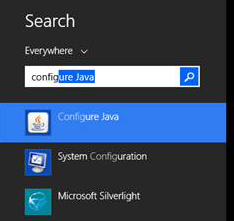
First, if you’re using Windows 7 or 8, press the windows key on your keyboard and type in “configure” (no quotes). In the list of applications that appear, you will see one that says “Configure Java”. Click that.

JavaConfigure

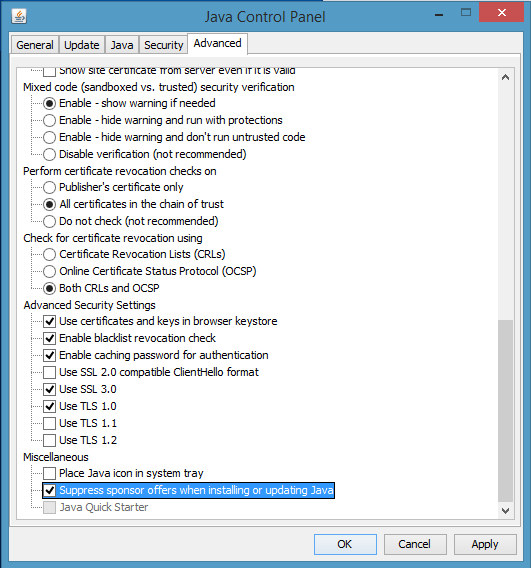
In the new window that opens, go to the last tab titled ADVANCED. Scroll to the very bottom, and in the “miscellaneous” section is an option for “suppress sponsor offers when installing or updating java.” Put a check in that box to prevent any future “extras” from sneaking in during your java updates.

JavaPreference

Easy and done!

Where you can download Microsoft Office with an activation key card

Have you ever received in a bundled laptop package a piece of paper that says…

“DO NOT DISCARD – MICROSOFT PRODUCT IDENTIFIER. The manufacturer of your PC has licensed the Microsoft products listed in this document.”

…and a few paragraphs later…

“This card includes the ACTIVATION KEY for your MICROSOFT OFFICE product.”

It seems straightforward enough, right? There’s the serial number at the bottom (strategically covered by my “apparently plays in the dirt for a living” thumb), and a website link at the bottom to go download and register the software.

SerialCard

 
So here’s the happy happy joy joy part – the website listed on every one of these rat-bastard product cards say to go to microsoft.com/office

You go there, you swim in the abyss.

Microsoft.com/office takes you straight down into the “light don’t reach here” depths of Office sales, where you will be offered every iteration of Office 360, Office online, Office a-la-carte, Office with Cheese and dozens of other suites in every combination possible. Links to links to links to links, but nothing to take you to download your software or point you out of the maze.

Here’s what you need to do. If you have one of these activation cards for Office, go straight to Office’s other website…

office.com/setup

Once you’re there (and it automatically redirects you to officesetup.getmicrosoftkey.com) just type in the product key on that piece of paper in the “Enter Your Product Key” box and press GET STARTED.

That’s it.

You will then be prompted to download your Office Suite and tie it into one of your email accounts.

Just like that.

Who knew instructions on how to download and install your software should actually have a link so you can, oh I don’t know, ACTUALLY DOWNLOAD AND INSTALL YOUR SOFTWARE?!

Qik, one of my favorite apps, is gone as of April 30th

Qik was on the short list of apps I immediately loaded on every new iDevice I got.

Not only could I make audio or video calls to anyone I wanted, but whenever I saw something I wanted to capture on video, all I did with Qik was open the app and shoot away. I could choose anywhere from 320 to 720 resolution, shoot from either my front or back cameras, and as soon as I was done, I could edit the video right there.

Qik1

As soon as I was done with the video, it would appear on my own Qik page (private or public), I could send that video to anyone in my contact list, or I could send it direct and private to any other Qik user. Straight from my i-device.

But the best part? The best best best part? Live video.

Qik2

I could choose whether the videos would be for private or live viewing. I could shoot live video that I would immediately stream to a set of trusted contacts to let them know what’s up right then and there, stream live video my YouTube channel, and even send live video streams straight to this website!

Qik was a true “breaking news” app that was horrifically under-appreciated, so it was inevitable that one of the big 500 pound gorilla tech companies was going to notice it.

Unfortunately for Qik, and for all of us consumers, it was Microsoft that bought them out.

Pushing back all the fantastic design and technical progress Qik  had made, Microsoft announced Qik was just going to be shut down, and only their own rusted and busted Skype offering would remain.

If you can’t Innovate, Stifle-ate.

Qik was so much more than a call-another-user or send-a-text-message app. Did Microsoft bring any of these brilliant live-video abilities into Skype? BWA HA HA!! Please.

Now I’m going to have to get four or five other apps to do the job that Qik did perfectly all the time.

I’m gonna miss you Qik. Big time.

The official announcement on Qik’s shutdown and how to get anything you have left in their system out is here.

Last call for the Sony Reader store

It’s last call for the Sony Reader store.  Tomorrow (March 20th) at 6 PM eastern time, they’re pulling the plug for good.

In their press releases and in their reader FAQ, Sony says they will be sending out instructions on how to link all book and periodical purchases made in the Sony Reader store to a Kobo account, but only after the Sony Reader Store has completely shut down.

Why wait until a few days after the store has shut down to send these directions? Because they’re SONY, DAMMIT. They made Walkmans these young’uns with their newfangled iKindlePad thingamajigs don’t appreciate none!

You can read the “we’re outta here” post here, the Sony Ereader Store closure FAQ here, and the directions on how to download your previous purchases here (but no directions on how to move everything you might have bought to Kobo yet).

STAX6 (AKA: Texas Sales Tax Filing App) missing file upload fix

If your company is using the brand new state of Texas STAX6 application to upload monthly sales tax reports, the new default path for the pre-upload file is going to be in the C:\ProgramData\TexasCPA\Stax6 directory.

The problem is, C:\ProgramData\ is a hidden directory by system default.

Great location for a default save path, STAX!

Your accounting team isn’t going to find a C:\ProgramData\ directory when they fire up a browser and launch the state’s upload tool, and they’re not going to see it when they open the C: drive from Windows Explorer either. Panic isn’t a strong enough word for what will ensue.

To keep everyone’s blood pressure down, right click on the STAX6 uploader(s) desktop and create a NEW>SHORTCUT to C:\ProgramData\TexasCPA\Stax6 and save it right on their desktop. Instead of searching their C:\ drive for a hidden directory, have the STAX6 uploader(s) point the state’s upload directory tool to that Stax6 shortcut on their desktop, and from there the monthly tax files will appear in a list.

If they have already closed the STAX6 application, or don’t remember which .txt file to upload, you can search for the filename in the format ST(MONTH)(DAY)n(VERSION).txt (example: ST1217n1), or just search for .txt files modified in the last couple of hours (including protected and invisible files and folders).

One more thing – the new STAX6 is 64 bit only, so if you’re running on a old(er) operating system, you don’t have a choice on updating anymore.

Disney is closing down their Movies Online service on Dec. 31st

Disney just announced in a press release they are closing their entire stream-and-watch digital service on December 31st.

If you made any purchases directly with the online streaming store you can get a refund (according to the FAQ) by sending an email “by February 28, 2013 to support@disneymoviesonline.com with “Refund Needed” in the subject line. Be sure to include your name, mailing address, and phone number … and we will mail you a check. No additional action is necessary on your part.”

This doesn’t have anything to do with the Disney Combo packs with a “Digital Copy” sticker that are still in stores. You can still download those from either iTunes or Windows Media Player on your computer (according to the FAQ) like this…

  • Transfer to Mac:
    • Insert the Disney Digital Copy disc into your Mac’s DVD drive, launch the application, click on the “Activate” button from the main menu and follow the on-screen instructions.
    • The iTunes application will open and guide you through the transfer.
    • When prompted by iTunes, enter the unique code found on the insert located in your DVD or Blu-ray package to activate your Disney Digital Copy.
    • After the transfer completes, the movie can be watched on your Mac and transferred to your iTunes compatible device.
  • Transfer to PC:
    • Insert the Disney Digital Copy disc into your PC’s DVD drive, launch the application, click on the “Activate” button from the main menu and follow the on-screen instructions.
    • Choose either iTunes or Windows Media for your Disney Digital Copy.
    • If you choose iTunes, the iTunes window will automatically open and guide you through the transfer:
      • Input the unique code found on the insert located in your DVD or Blu-ray package to activate the Disney Digital Copy
      • After the transfer completes, the movie can be watched on your PC or transferred to your iTunes compatible device.
    • If you choose Windows Media, follow the steps below:
      • When prompted, input the unique code found on the insert located in your DVD or Blu-ray package to activate the Disney Digital Copy and follow the on-screen instructions.
      • After the transfer completes, the movie can be watched on your PC and transferred to your PlaysForSure compatible portable device.


The Disney-streaming-movies was brilliant while it lasted. After logging in to the service and keying in a unique code for every Disney movie,  you could watch that movie anytime from any web browser! That was a stroke of genius! Why not watch the movie when you want where you want if you own the original copy!?  Unfortunately, some dopey-grumpy-greedy dwarf must have found out about this brilliant idea, and that was that. I bet there will probably be a “monetized” version of this service in mid-2013.

Dailybooth is shutting down. Download your photos before December 31st.

If you haven’t heard by now, Dailybooth is shutting down.

If you are a Dailybooth user, you can still download your photos by going to http://dailybooth.com/export and signing up for an archived download of all your photos.

Here’s a copy of the email sent to all users…

“Dear *|USERNAME|*,

A picture a day, every day. DailyBooth was launched based on that simple idea. We never could have imagined what it would become more than three years later.

The community each one of you helped create is truly one of a kind. There have been many unforgettable memories created amongst us and none of this would have been possible without you. For that, we’re truly grateful for what you’ve helped DailyBooth become.

Regrettably, this email comes with unfortunate news. DailyBooth is shutting down. Keeping the website running is no longer feasible.

On Wednesday, November 14th, the website will no longer allow you to add new content. Shortly thereafter, the website will be changed allowing you to only be able to download your photos. You’ll be able to download your photos until December 31st, 2012. After this date all content will be permanently deleted.

We can’t thank you enough for everything.”

Syncing nightmare with Bento (AKA: Erasing a database in one step)

Here’s something I found out the hard way.

If you use Bento for Mac and iPhone, deleting a database on the iPhone will also delete the master database on the Mac on the next sync.

Let me type that again, because I still can’t believe it.

If you delete a Bento database on the iPhone, on the next sync, the master database on the Mac, the one with all the critical information you’ve been building up, will be completely erased.

No warning. No confirmation. No temp file hiding in the library. Nothing in the trash to recover. The database is gone. Wiped out. Nuked from orbit. Buh-bye.

Deleting a master database from a field device should take confirmation, a second password confirmation, re-re-confirmation, and the last two addresses you’ve lived at. For a database program to allow an immediate nuke without any prompt? That’s beyond unacceptable.

Filemaker knows about this issue (here and here), but their response has always been “ah, just restore from weekly backup”.

Ah, no. Hell no. This is a crippling “should have never got out of beta” design flaw.

Zero-star rating for Bento. Don’t ever use this app.

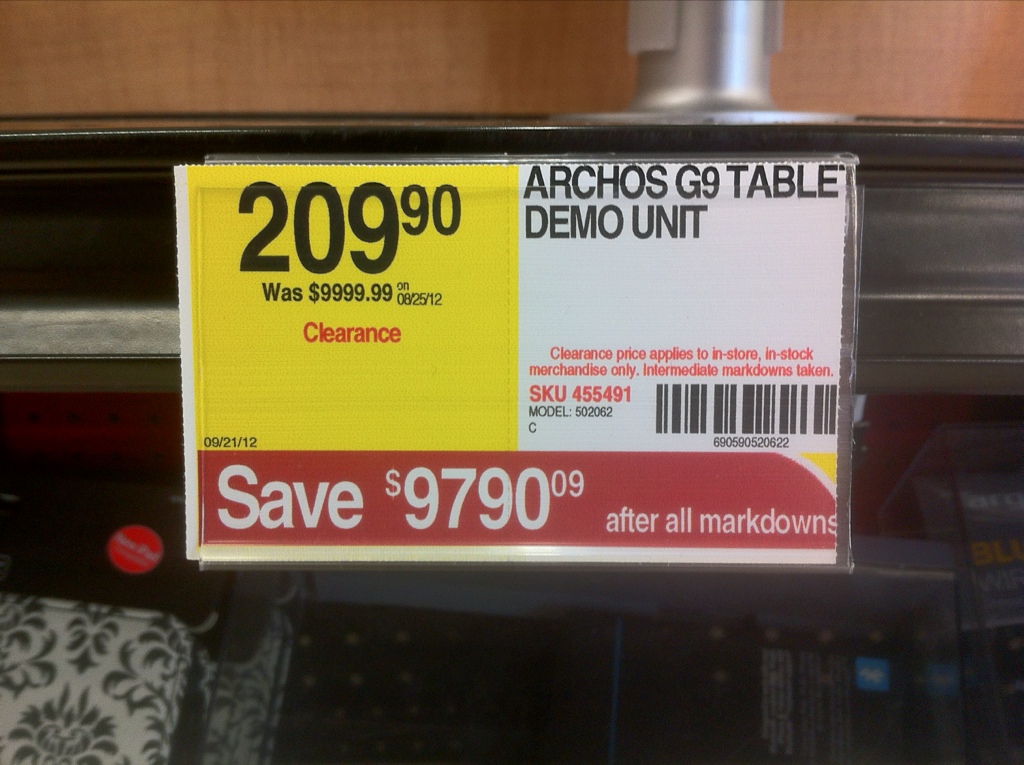
Was $9,999.99. Now only $209.90! [PHOTO]

20120926-090223.jpg

I didn’t think the Archos series was that expensive.